
Key takeaways
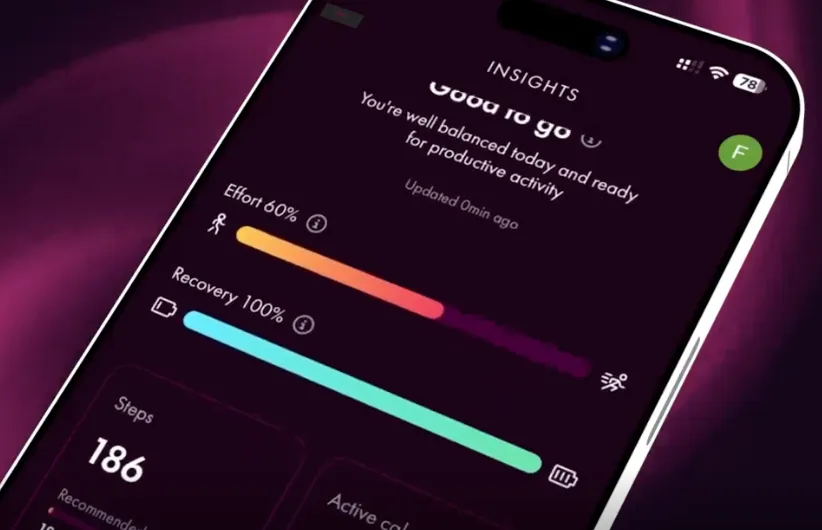
- My Insights turns the health data you already track into three daily scores: Effort, Recovery and Readiness.
- Each score reflects a different part of your day, so together they show more than any single number can.
- Every score measures against your own typical levels, so a “good” day looks different for you than for anyone else.
- The app uses your daily scores to recommend content that matches how you are actually doing.
- Setup takes one step: connect Apple Health on iOS or Health Connect on Android.
Introducing My Insights
Your phone and watch already track a lot. Steps, heart rate, sleep, workouts. The trouble is that raw data rarely tells you what to actually do with your day.
My Insights turns that data into three daily scores. Effort reflects how much you’ve been pushing your body. Recovery reflects how well you’ve bounced back. Readiness brings the two together to suggest how prepared you are for the day ahead.
Think of the three as a daily snapshot, not a diagnosis. They give you a quick read on how you’re doing right now, measured against your own normal rather than a fixed target.
This article explains what each score means, why yours is personal to you, and how the app uses them to shape what you see.
Effort, Recovery and Readiness explained
Your Effort score reflects how much your body has worked today, drawing on movement, exercise, and physical strain. Push hard and the score climbs, which is your cue to protect that effort with rest, food, and a lighter evening. Spare some capacity instead, and the lower score tells you there is room to take on more without paying for it later.
Your Recovery score reflects how well your body has repaired since yesterday, drawing on signals like sleep and resting heart rate. A strong bounce-back lifts the score and clears you for a demanding session or a busy schedule. A poor night keeps it low, and that is the signal to choose gentler activity and an earlier night over another hard push.
Your Readiness score pulls the other two together to show how prepared you are for the day ahead. Plenty of effort in reserve and solid recovery push it up, so you can plan the harder tasks with confidence. Run closer to empty on either one, and the score drops, pointing you toward easing off and rebuilding before you spend more.
No single one of these three scores tells you what to do on its own. A high Effort score looks like a warning if your Recovery is also low, but the same Effort reads as a productive day when your Recovery is strong. Readiness only makes sense once you know how much you have exerted and how well you have rested. Read together, the three scores show whether today is a day to push, to hold steady, or to pull back.
Why your score is personal to you
Your Effort, Recovery and Readiness scores are measured against your own typical levels, not a fixed target that treats everyone the same. A step count or resting heart rate that signals a great day for one person might sit right in the middle of the range for another. A “good” day is defined by how today compares to what’s normal for you, not by a number on a chart.
Take two people whose watches log almost identical raw data on the same morning. One usually runs a lower resting heart rate and slept well all week, so today looks average and their Readiness score sits in the middle. The other rarely sleeps this well and normally carries more fatigue, so the same numbers land as a standout day and their Readiness score climbs. The data is nearly the same, but the meaning is not, because the app reads each number against the person it belongs to.
Generic health targets fail because they ignore this variation. A blanket goal of 10,000 steps or eight hours of sleep tells you nothing about whether today was strong or stretched for your body. Advice built on those fixed numbers ends up too easy for some people and out of reach for others, and it rarely matches how you actually feel. My Insights learns your usual range over time and adjusts as that range shifts. You get a score that reflects your own progress rather than someone else’s benchmark.
How your scores shape what you see in the app
Each day, My Insights reads your Effort, Recovery and Readiness scores and changes what the app suggests to match how you are actually doing. The recommendations follow your current state, not a fixed plan you agreed to weeks ago.
On a low Recovery day, the app leans toward gentler content. You might see a short breathing exercise, a wind-down routine, or something on protecting your sleep that night. The app assumes your body needs less load, not more, and points you there.
On a high Readiness day, the suggestions shift the other way. You might get a longer workout, a focus session, or a prompt to tackle something demanding while you have the capacity for it. The same app that recommended rest yesterday now encourages you to push.
My Insights replaces the generic feed most health apps rely on, where everyone sees the same suggestions regardless of how their day is going. A workout that suits you when you are fresh is the wrong call when you are depleted, and a rest prompt wastes a day when you feel strong. By reading your scores first, the app matches its advice to your real state rather than a default. You spend less time deciding what is right for today, because the content already reflects it.
Setting up My Insights
Setup takes one connection. On iPhone, connect Apple Health. On Android, connect Health Connect. Once that link is in place, My Insights starts building your Effort, Recovery and Readiness scores from the data already there.
You do not need to add each device or app on its own. If your watch, ring, fitness tracker, or sleep app already sends data to Apple Health or Health Connect, it feeds My Insights automatically through that same connection. Anything you add to Apple Health or Health Connect later gets picked up too, with nothing extra to switch on.
That single link is the whole setup. The more your existing devices and apps feed in, the more accurate your daily scores become, because My Insights has more of your real activity, sleep, and recovery data to read.
Frequently asked questions
What does a low Recovery score mean?
It means your body is still catching up from yesterday, usually from poor sleep or high resting heart rate. Gentler activity and an earlier night serve you better than pushing hard again.
How is my Readiness score calculated?
Readiness combines your current Effort and Recovery scores into a single read on how prepared you are for the day. Strong recovery and effort in reserve push it up, while a shortfall in either pulls it down.
How long until My Insights reflects my normal levels?
My Insights builds your baseline from the data already in Apple Health or Health Connect, and it keeps adjusting as your typical levels shift over time. The more history and devices feeding in, the more accurate your scores become.
Do I need a specific wearable to use My Insights?
No. My Insights works with any watch, ring, or app that already sends data to Apple Health or Health Connect. There is nothing extra to connect beyond that one link.
Can I see all three scores at once?
Yes. Effort, Recovery and Readiness appear together each morning in My Insights, so you get the full picture rather than one number in isolation.
Start using My Insights
Update the Champion Health app to start using My Insights. Open your app store, install the latest version, and connect Apple Health if you’re on iPhone or Health Connect if you’re on Android. Once you’ve updated and connected, you’ll find your Effort, Recovery and Readiness scores in My Insights, ready each morning. From there, your daily content will start matching how you’re actually doing, so you spend less time deciding what to do and more time acting on advice that fits your day.